So. My name is. Zuppers. Zuppy. Zuppa. Zupps. Smith. Zups. Sups.
A little about myself before I post some mods.
I like to take mods and try to make them to the way people like them. For example the GTA V HUD by
DK22Pac and I make it less laggy for people with lower end computers. I also take Overdose mods and make them less laggy when used.
NO LAG
If you tend to lag when changing radio stations, sniping, and more follow this.
•Open your GTA Directory.
•Find your GTA V HUD Folder.
•Look for "
effects" Should be near the bottom.
•
DELETE everything besides these:
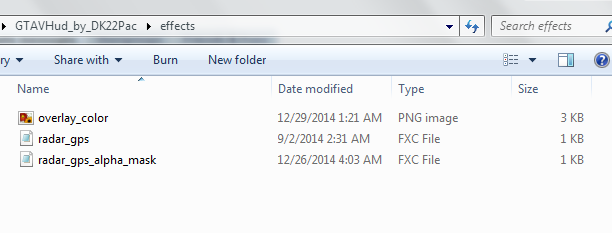
NO SNIPER LAG
You may lag when using a sniper, and it's horrible. I will teach you how to make it lag free.
•Open your GTA Directory.
•Find your GTA V HUD Folder.
•Look for "effects" Should be near the bottom.
•Open the "effects" folder.
•Delete:
"crosshairlens.fxc"
"crosshairblue.fxc"
"blur.fxc"
"blur(x2).fxc"
NO GRID LINES
Quote from: NexusCan you also make a tutorial on how to remove the grid lines when using a camera with the GTA5 HUD?
Here you go!
Copy this code to: GTA DIRECTORY/GTAVHud_by_DK22Pac\phone. Then click on the phone.ini and copy this.
; File creator: DK22Pac
; File editors:
[PHONETEX]
phonerect.x1=254.0
phonerect.y1=392.0
phonerect.x2=18.0
phonerect.y2=-22.0
displayPosn.offsetX1=19.0
displayPosn.offsetY1=52.0
displayPosn.offsetX2=216.0
displayPosn.offsetY2=306.0
[CLOCK]
posn.x=132.0
posn.y=337.0
scale.x=0.4
scale.y=0.9
alignment=0
color.r=230
color.g=230
color.b=230
color.a=230
style=1
prop=1
outline=0
outlinecolor.r=0
outlinecolor.g=0
outlinecolor.b=0
outlinecolor.a=255
format=%02d:%02d
[MONTHDAY]
posn.x=193.0
posn.y=337.0
scale.x=0.4
scale.y=0.9
alignment=1
color.r=230
color.g=230
color.b=230
color.a=230
style=1
prop=1
outline=0
outlinecolor.r=0
outlinecolor.g=0
outlinecolor.b=0
outlinecolor.a=255
[GENERAL]
cameraView=0 ; 0 - phone + blur, 1 - grid ; 2 - phone + grid
cameraPhoneDistY=10.0 ; camera phone position (phone + grid mode)
phoneAnimTime=300
Overwrite it and then you're good.
If there is anything you might need/want post here and I will gladly explain something and try my best to do it.
I have a guide on the crosshair but due to the bbcode restrictions I can't post it.
I do not take credit for the crosshair, I only take credit for editing it and posting it with his name on everything.
Quote from: HemingwayIs there any way you could just remove all HUD when in camera? No lines, no mobile phone, no blur? I replaced stock camera.txd with empty "crosshair" for camera because I don't like those compressed pictures but when I installed this, I have all these lines and mobile phone and blur that I don't want nor need.
So a lot of people make videos with the camera and use it without the lines. People also use this HUD. Follow these steps to have a blank camera while using this HUD.
Found your answer.
So you're going to go to:
GTA DIRECTORY/GTAVHud_by_DK22Pac/phone/phone.iniOpen it and replace the text with:
; File creator: DK22Pac
; File editors:
[PHONETEX]
phonerect.x1=0
phonerect.y1=0
phonerect.x2=0
phonerect.y2=-0
displayPosn.offsetX1=0
displayPosn.offsetY1=0
displayPosn.offsetX2=0
displayPosn.offsetY2=0
[CLOCK]
posn.x=132.0
posn.y=337.0
scale.x=0.4
scale.y=0.9
alignment=0
color.r=230
color.g=230
color.b=230
color.a=230
style=0
prop=0
outline=0
outlinecolor.r=0
outlinecolor.g=0
outlinecolor.b=0
outlinecolor.a=255
format=%02d:%02d
[MONTHDAY]
posn.x=193.0
posn.y=337.0
scale.x=0.4
scale.y=0.9
alignment=1
color.r=230
color.g=230
color.b=230
color.a=230
style=1
prop=1
outline=0
outlinecolor.r=0
outlinecolor.g=0
outlinecolor.b=0
outlinecolor.a=255
[GENERAL]
cameraView=0 ; 0 - 0 , 1 - grid ; 2 - phone + grid
cameraPhoneDistY=0 ; camera phone position (phone + grid mode)
phoneAnimTime=0
Pictures:

 Note:
Note: You're going to press F9
ONCE if you're on a DM server, and hit F7
TWO times to get rid of the HUD for the camera.
[/hr]

